
Testing a faster path from framing to prototype
A focused timesheet experience in Microsoft Teams, taken from problem framing to a runnable prototype in around two hours.
I set myself a deliberately contained product challenge to test whether AI-assisted tools could shorten the path from problem framing to a working prototype without skipping the design thinking in between.
I chose timesheet entry because the workflow was familiar and constrained: record time against work, review the week and submit it. Microsoft Teams added another useful constraint — the experience needed to feel focused and at home in the environment rather than like a standalone application placed inside it.
The goal was not to prove a new product proposition. It was to test a different way of moving from product thinking into a working interface.
Start with the problem, not the prompt
Select week
Choose the week the user wants to log time for.
Review assigned projects and tasks
See the projects and tasks assigned for the selected week.
Enter time
Log time against tasks for each day of the selected week.
Handle leave
Add leave entries for applicable days.
Submit for approval
Submit the timesheet for manager review.
Review corrections or rejected timesheets
Address feedback and resubmit until approved.
Before generating an interface, I used ChatGPT to help structure the problem: who the experience was for, the primary job, the core workflow, likely edge cases and what needed to stay out of scope.
That gave me a deliberately small brief:
Team members should be able to record and submit their time in a focused experience that fits naturally inside Microsoft Teams.
I then used Microsoft Teams and Fluent UI conventions as constraints for the interaction design.
Make the direction tangible
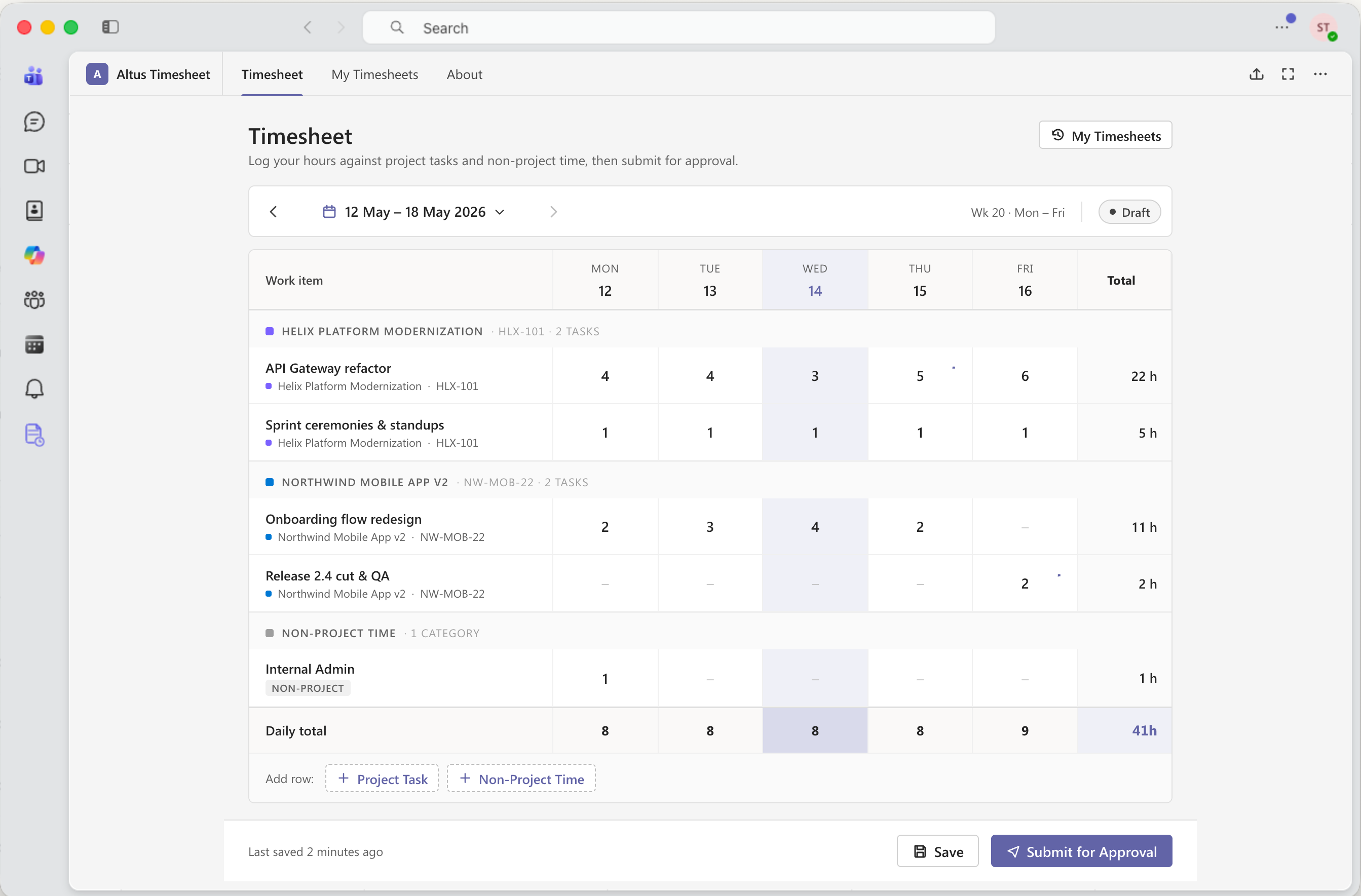
The prototype covered entering time against project tasks, adding project and non-project rows, navigating timesheet periods, reviewing totals, saving work in progress and submitting a timesheet.
I used Claude Design for interface exploration and Claude Code to turn the concept into a runnable prototype inside Microsoft Teams.
From initial problem framing to the working prototype took around two hours. The useful part was not simply the speed. I could move almost continuously from understanding the problem, to making product decisions, to evaluating realistic interaction behaviour while the direction was still easy to change.
The prototype used fictional data and simulated integration. It was an exploratory design prototype, not production-ready software.
Closing the gap between thinking and making
The experiment showed me that AI-assisted coded prototyping could shorten the distance between product reasoning and something concrete enough to evaluate.
Instead of treating problem framing, interface design and prototyping as separate phases, I could move between them continuously — testing a decision in the interface, seeing how it behaved and changing the direction while the thinking was still fresh.
The prototype did not prove production feasibility, commercial viability or usability improvement. What it demonstrated was a faster way to make a product idea tangible without removing the need for product judgement, interaction design or critical evaluation.